Make your site more inclusive with WP Firefly Accessibility — a lightweight, modular plugin that grants users essential control over readability and usability, without touching your design or performance.
Built to empower visitors—without hijacking your design
WP Firefly Accessibility is designed to enhance your site, not take it over. Unlike bloated accessibility overlays that inject heavy scripts, distort layouts, or fight with your theme’s styling, this plugin operates inside its own clean, isolated Shadow DOM, keeping your brand’s presentation pixel-perfect. Visitors can toggle accessibility options like font scaling, high contrast, reduced motion, focus outlines, skip-to-content, and media autoplay—all instantly, with no reloads or page flicker. Every choice is stored locally per user via localStorage, meaning preferences persist between visits without ever touching your database or adding unnecessary load. It’s accessibility that feels native, seamless, and invisible until needed.
Precision control for site owners
You decide exactly how the experience looks and behaves—from launcher positioning, icon style, and color palette to button offsets, accent shades, and accessible labels. The widget doesn’t override your theme or inject itself into your DOM until a user interacts with it, ensuring your design remains pristine and untouched. Whether you want a subtle floating button in the corner or a bold accessibility icon that stands out, every aspect can be tuned to align perfectly with your visual identity.
Lightweight. Blazing fast. Rock solid.
WP Firefly Accessibility runs on pure vanilla JavaScript and CSS—no jQuery, no bulky frameworks, and no external dependencies. It’s fully CDN-friendly and optimized for modern browsers, keeping your Core Web Vitals healthy and your page load speeds lightning-fast. The plugin adds functionality without weight, ensuring flawless compatibility across builders, themes, and caching systems. This is accessibility done right: fast, flexible, and built for the modern web.
User-Controlled Accessibility
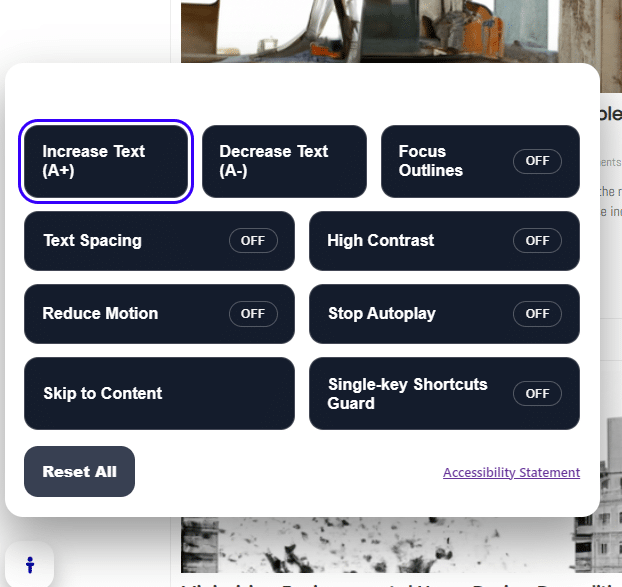
Empower every visitor with instant control over their browsing experience. Text size, spacing, contrast, motion reduction, and focus outlines are all user-adjustable without affecting your site design or layout. Everything runs client-side, so performance stays lightning fast.
Privacy-First Design
WP Firefly Accessibility stores all user preferences locally on their device—nothing is tracked or saved to your database. Visitors return to a site that remembers their settings without sacrificing privacy or compliance.
Complete Admin Customization
Position the accessibility launcher anywhere on screen, choose from multiple icon options, set custom colors, margins, and labels—all directly from your dashboard. Fine-tune the experience to match your brand while maintaining full WCAG compatibility.
Non-Intrusive, Shadow DOM Integration
Unlike bloated overlays that hijack your layout, WP Firefly Accessibility lives in its own self-contained environment using a modern Shadow DOM structure. That means no theme conflicts, no broken layouts, and perfect isolation from your site’s CSS or scripts.
FAQ’s
How to Use WP Firefly Accessibility
1. Activate the Plugin
After installing WP Firefly Accessibility, activate it from your WordPress Plugins page. Once activated, you’ll find a new “Accessibility” tab under the WP Firefly menu.
2. Configure Your Preferences
Open the Accessibility settings page to customize:
-
Launcher Position: Choose where the accessibility button appears (bottom-left, bottom-right, top-left, or top-right).
-
Design Settings: Adjust colors, margins, and labels to match your site’s theme.
-
Features: Toggle on or off individual options like Text Size, High Contrast, Reduce Motion, Focus Outlines, and more.
3. Save & Publish
Click Save Settings. The floating accessibility button will now appear on your site immediately—no shortcode or theme editing required.
4. User Interaction
Visitors can click the Accessibility button to open the control panel. From there, they can:
-
Increase or decrease text size
-
Toggle high contrast mode
-
Adjust text spacing
-
Reduce motion effects
-
Enable or disable focus outlines
-
Stop autoplaying media
Each choice is remembered locally in their browser, so returning users will see their preferences applied automatically.
5. Reset & Testing
To test the widget, clear your browser’s local storage or click “Reset All” inside the accessibility panel. This ensures the defaults and toggles reset as expected.
WHY WPFIREFLY?
Us VS Them
| Competitor | Type | Starting Price | Notes |
|---|---|---|---|
| Tidio | Chatbot SaaS | $29/mo | Limited AI, $39+ for advanced features |
| Drift | AI Chatbot SaaS | $1500+/mo | Enterprise-focused, expensive |
| LivePerson | Enterprise AI Chatbot | Custom Pricing (>$500/mo) | Not SMB-friendly |
| AI Engine (WordPress plugin) | Chatbot/Content AI | $49/year | No multi-assistant or page builder features |
| Uncanny Automator | Workflow Automation Plugin | $149/year | Automation only, no AI |
| ManyChat | Messenger Bot SaaS | $15–$99/mo | Not optimized for websites |
| WPFirefly Bundle | Full Plugin Suite | $29/mo | ✔️ ULTIMATE AI Chatbot + ✔️ AI SEO + ✔️ Auto Blogger + ✔️ FAQ AI Builder + More! |
🔥 Limited Time Offer: Plans from $29/mo (Normally $129/mo)
- Monthly
- Yearly
1 Site License
Number of Sites: 1
All Plugins Included!
Some examples:
- WP Firefly AI Auto Blogger
- Single Page & Post Custom CSS
- URL Var to Form Field
- WPFirefly 2FA
- WP Firefly Content Pilot
- WpFirefly Product Gallery
- WPFirefly Admin Search
- WP Firefly
AND MANY MORE!
$15.00
Monthly
5 Site License
Number of Sites: 5
All Plugins Included!
Some examples:
- WP Firefly Content Pilot
- WP Firefly FAQs With AI
- URL Var to Form Field
- Single Page & Post Custom CSS
- WPFirefly Staff Directory
- WPFirefly Admin Search
- WpFirefly Product Gallery
- WPFirefly Blog Customizer
AND MANY MORE!
$45.00
Monthly
10 Site License
Number of Sites: 10
All Plugins Included!
Some examples:
- Location Mapper
- WP Firefly Dismiss All Alerts
- WP Firefly Accessibility
- WP Firefly Gravity Guide
- WPFirefly AI Assistant
- WP Firefly FAQs With AI
- URL Var to Form Field
- Single Page & Post Custom CSS
AND MANY MORE!
$79.00
Monthly
Developer License Unlimited*
Number of Sites: Unlimited*
All Plugins Included!
Some examples:
- WPFirefly Staff Directory
- WP Firefly AI Auto Blogger
- WPFirefly 2FA
- WP Firefly Accessibility
- WPFirefly Admin Search
- URL Var to Form Field
- WP Firefly
- Dynamic Header & Footer Script Manager
AND MANY MORE!
$129.00
Monthly
1 Site License
Number of Sites: 1
All Plugins Included!
Some examples:
- WP Firefly Dismiss All Alerts
- WP Firefly Accessibility
- Single Page & Post Custom CSS
- Login Expiry Notification
- WP Firefly: A/B Split Tests
- WP Firefly FAQs With AI
- WP Firefly AI Auto Blogger
- WP Firefly
AND MANY MORE!
$150.00
Yearly
2 Months Free
5 Site License
Number of Sites: 5
All Plugins Included!
Some examples:
- Login Expiry Notification
- URL Var to Form Field
- WPFirefly Blog Customizer
- WP Firefly: A/B Split Tests
- Location Mapper
- WP Firefly Dismiss All Alerts
- WPFirefly AI Assistant
- WP Firefly Gravity Guide
AND MANY MORE!
$450.00
Yearly
2 Months Free
10 Site License
Number of Sites: 10
All Plugins Included!
Some examples:
- WPFirefly AI Chatbot
- WPFirefly AI Assistant
- WP Firefly: A/B Split Tests
- WP Firefly AI Auto Blogger
- WP Firefly Accessibility
- WpFirefly Product Gallery
- Login Expiry Notification
- Single Page & Post Custom CSS
AND MANY MORE!
$790.00
Yearly
2 Months Free
Developer License Unlimited*
Number of Sites: Unlimited*
All Plugins Included!
Some examples:
- WPFirefly Admin Search
- WPFirefly Staff Directory
- Login Expiry Notification
- WPFirefly AI Chatbot
- WP Firefly
- WP Firefly: A/B Split Tests
- Single Page & Post Custom CSS
- WP Firefly SEO
AND MANY MORE!
$1290.00
Yearly
2 Months Free
* Unlimited plans are within reason, obvious abuse will have your license terminated without refund.