New Property lines, assessment history, French and Spanish
Your MLS® listings, as a real estate site people love to search.
Your MLS® feed (board RETS, RESO Web API or CREA DDF®) becomes a full-screen map search with property lines, listing pages, alerts, seller tools and leads, right inside WordPress. Built for REALTORS® and brokerages, with board rules built in. Included with every WP Firefly membership.
- Hourly sync
- SEO ready
- English, French, Spanish
- Updates through the Hub
Included, not sold separately
What other listing plugins sell as add-ons, built right in
No extra modules to buy. Map search, alerts, SEO and board rules are all part of WP Firefly Listings.
Full-screen map search
Price pins coloured by status, and area bubbles that show the number of homes and their price range on hover.
Price drops at a glance
Reduced homes keep their for-sale colour with a small down arrow on the pin, so the map stays easy to read.
Listings open over the map
A home opens in a drawer with its own web address. Arrows step to the previous or next result without closing it.
Draw an area
Draw with a mouse or a finger, or tap points. The outline is smoothed and only the homes inside it show.
Map tools, tucked away
Search as I move, zoom to results, this weekend’s open houses and map styles in one tidy Tools menu.
Near me, Follow me, drive mode
One tap centres the map on the visitor. Follow me keeps it there as they drive around.
Lifestyle chips
One-tap searches such as Waterfront, Acreage, Garage, New build, Price reduced and With video.
Type a search as a sentence
“3 bed with a garage under 400” becomes filters visitors can edit. Rules-based, not AI.
Travel times and nearby
Every home shows travel times to places you suggest, such as downtown or the hospital, or to the visitor’s own places. Plus nearby schools, beaches and trails.
True monthly cost
Mortgage, tax, heating, insurance and fees, adjusted for the home’s size, age and heating type.
Compare and shortlist
Compare 2 to 4 homes side by side, and share a shortlist family can react to without an account.
Saved and recently viewed
Saved homes, recently viewed homes and an open-house planner in their own tabs.
Saved searches and email alerts
New listings, price drops, status changes and open houses, instantly, daily or weekly.
Price and status history
A short story of every home: listed, reduced, conditional, with a price line.
Market activity
New listings, price changes, status changes, open houses and new video tours, newest first.
Photo viewer and tours
A full-screen viewer with captions and a thumbnail strip, plus video and 3D tours, each with its own badge.
Listing slideout your way
A drawer, a centred window or full screen, with links to each section of the listing and long sections folded.
Fast photos
Photos are resized by the board’s own image server (NSAR), about 50 KB instead of over 1 MB, with no copies stored.
Time on site
Cards and listing pages show how long each home has been on your site.
English, French and Spanish
Every word the plugin shows, for visitors and in the admin, with a language switch on the map, on listing pages or in your menu.
Sign in without a password
Members get a one-time link or a 6-digit code by email to sign in or sign up. Passwords still work for those who want them.
Installable app
Visitors add your site to their home screen, with an offline page and their last 30 homes viewed.
Google or OpenFreeMap
Free OpenFreeMap tiles with no key, or Google road and satellite maps with your own key.
Try features privately
Every feature has an Off, Preview or On switch, with a private preview link before visitors see it.
From search to showing
How buyers find their next home
Every step works on phones and desktops.
Search the map
Area bubbles turn into price pins as buyers zoom, filter or draw an area.
Open a home over the map
The listing opens over the map, with arrows to the next result. The search stays put.
New matches by email, daily
Save it or get alerts
Buyers save homes and searches and get emails for new listings and price drops.
Enquire or book a showing
The enquiry form arrives prefilled with the home they’re viewing.
See it in action
Real screenshots, real listings
Taken on a live brokerage site running WP Firefly Listings. Click any screenshot to see it full size.
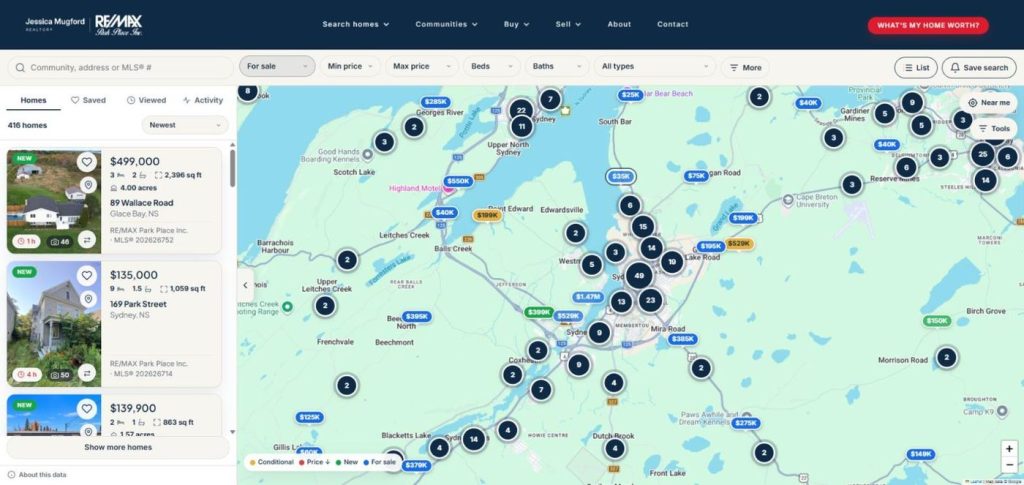
Map-first search
Status-coloured price pins, area bubbles and a results list that follow each other.
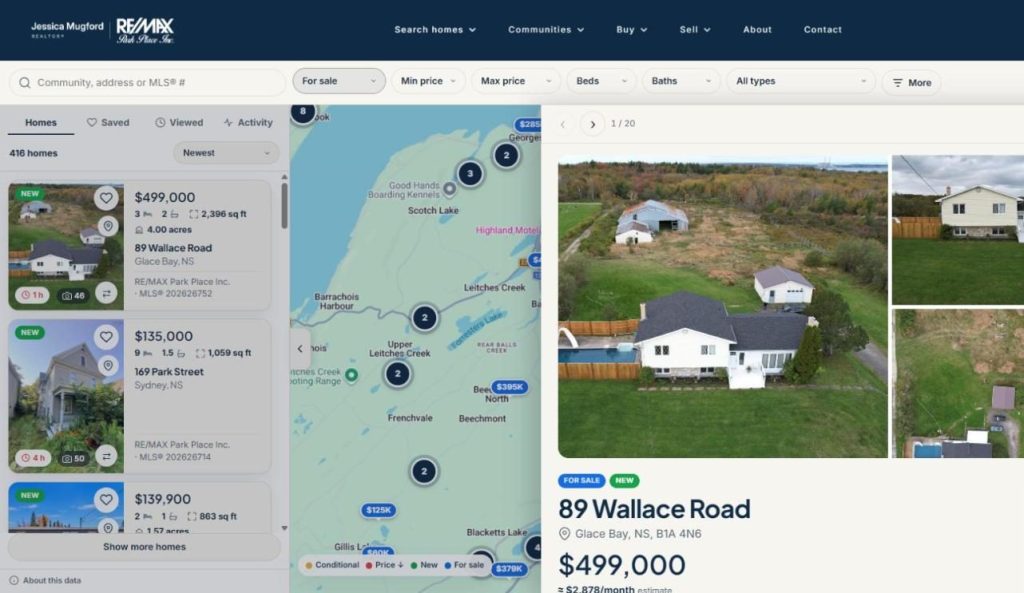
Open any home without losing your place
The listing slides open over the map. Arrows step through the results.
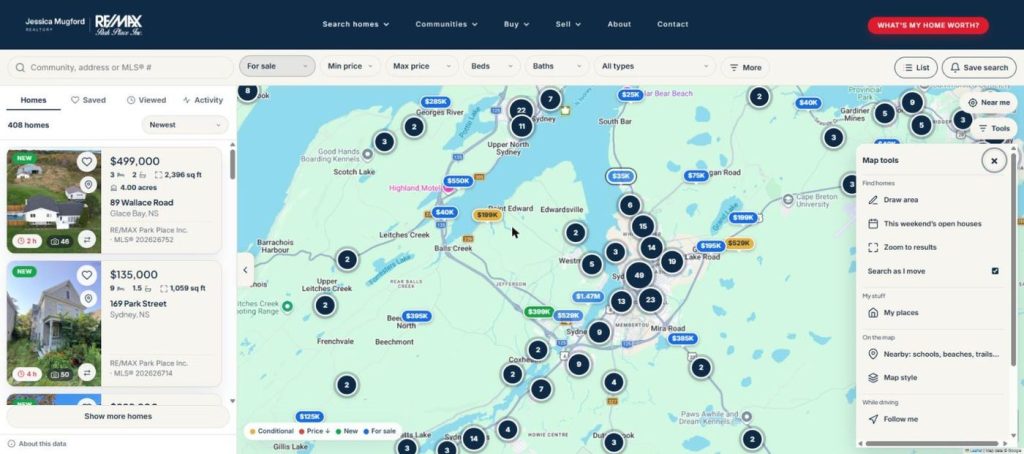
Power tools, tucked away
Draw an area, this weekend’s open houses, zoom to results, Follow me and more in one menu.
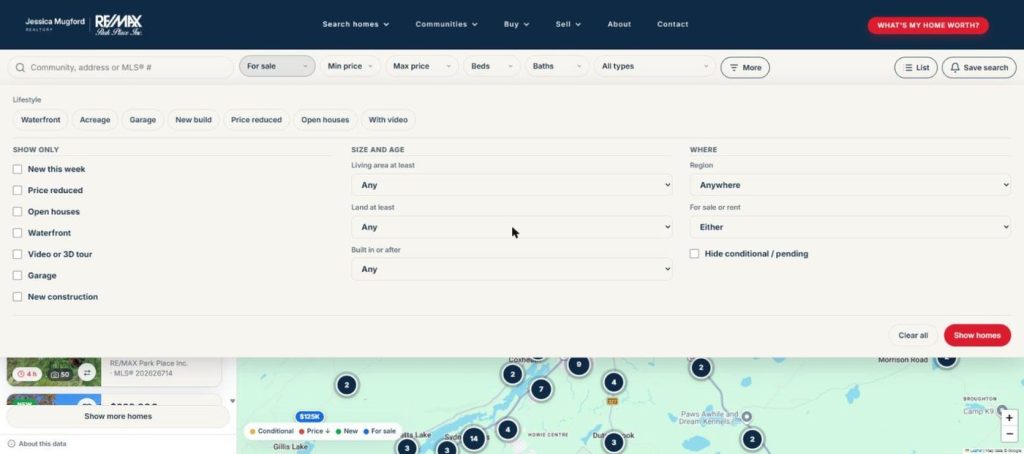
One-tap lifestyle searches
Waterfront, Acreage, Garage, New build, Price reduced and more, plus detailed filters.
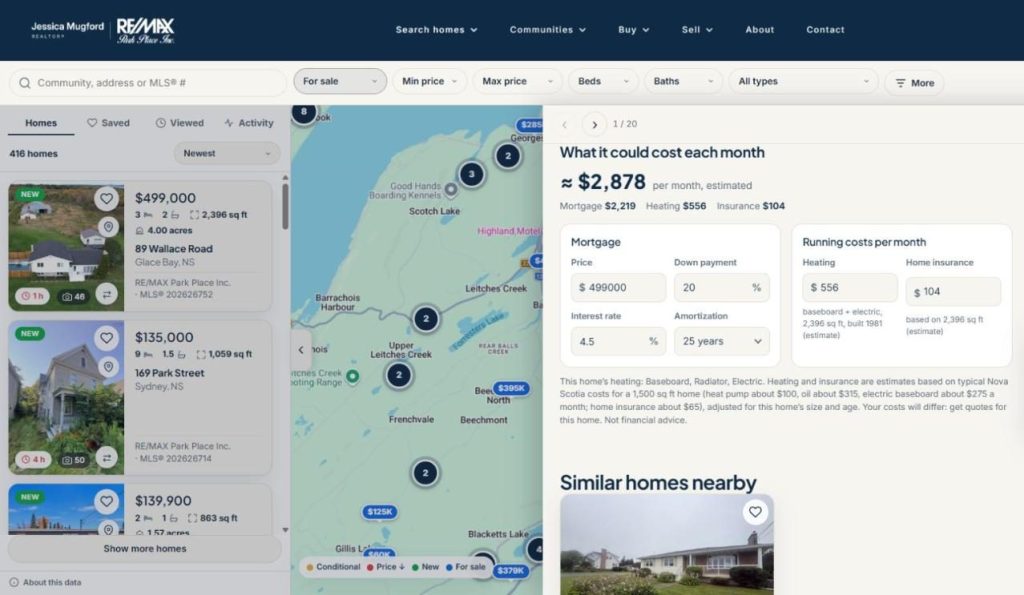
True monthly cost, not just the price
Mortgage, heating and insurance, sized to the home and editable by the buyer.
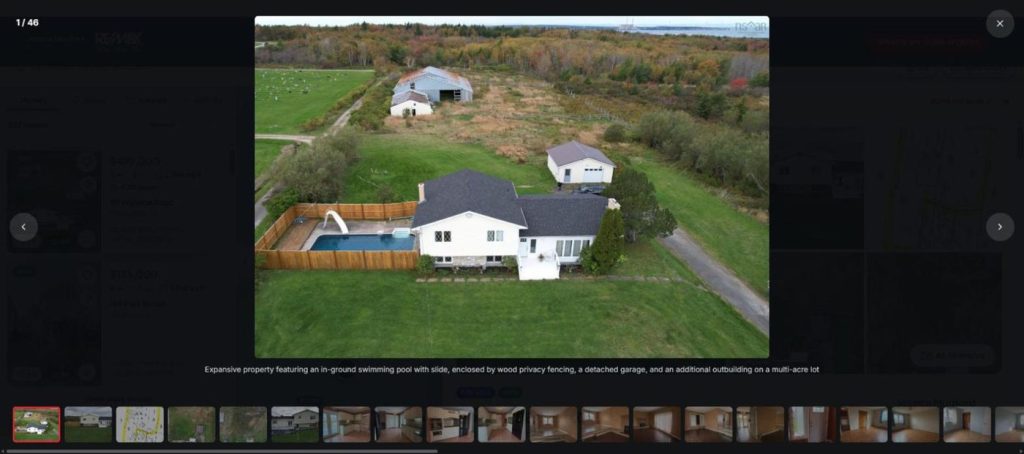
Every photo, full screen
Captions and a thumbnail strip in the photo viewer.
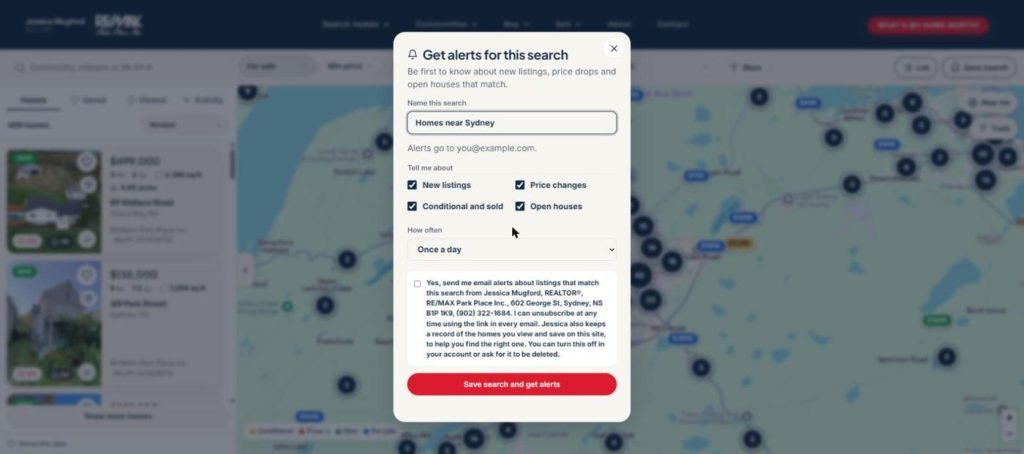
Saved searches and email alerts
Named after the map area, with what to be told about, how often, and clear consent.
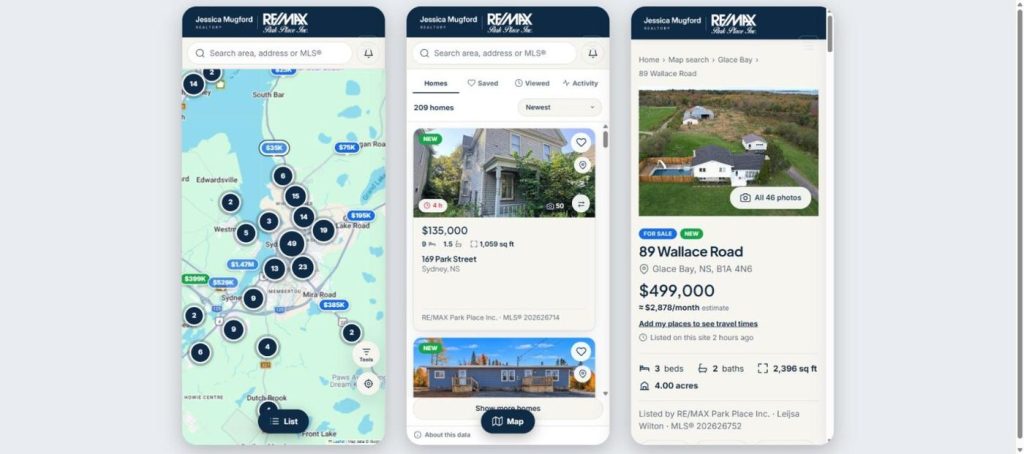
Built for phones
Map, list and listing pages designed for one thumb.
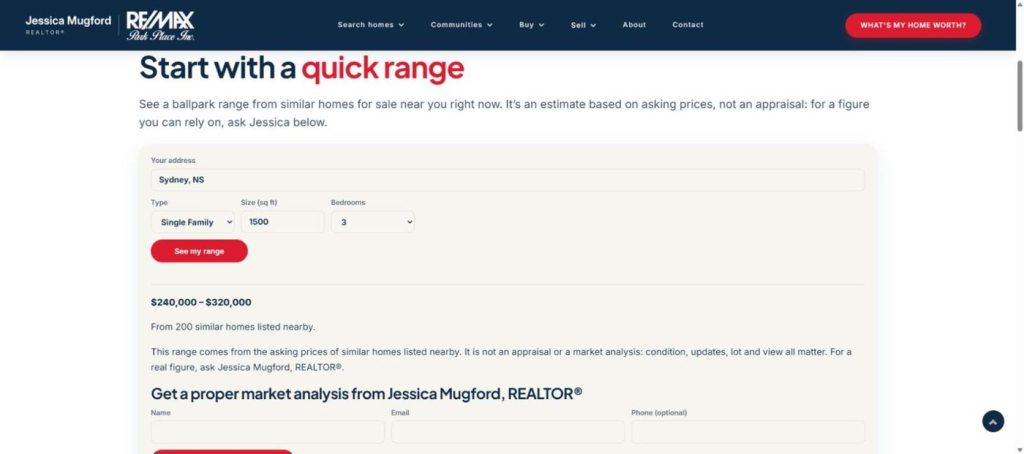
Seller leads from a home value range
A quick range from similar homes, then a request for a proper analysis.
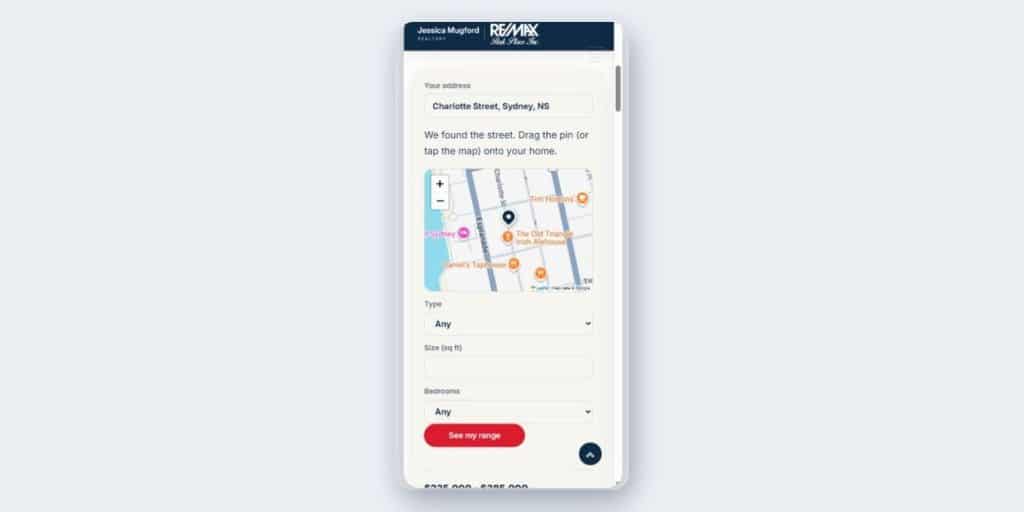
Address search that never dead-ends
Suggestions as you type, and a pin to drag onto the home when only the street is known.
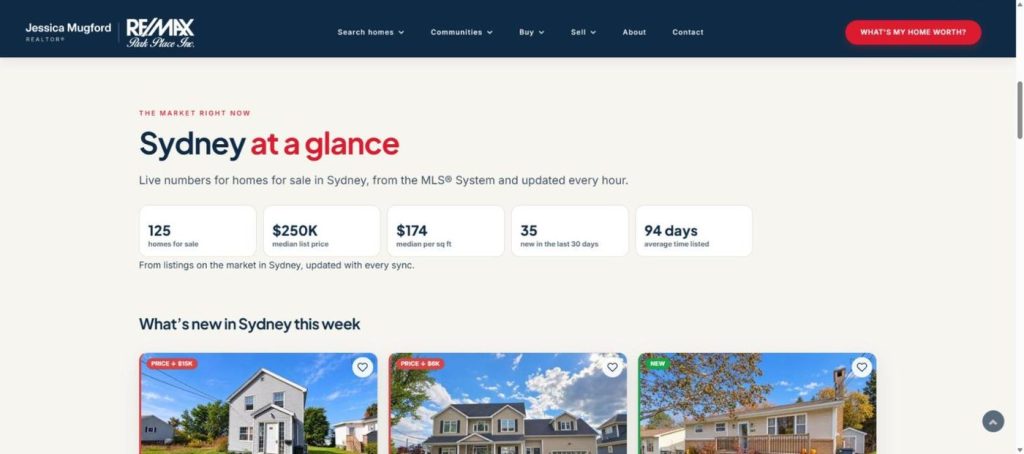
Live stats on every community page
Homes for sale, median prices, new listings and time on market, updated with every sync.
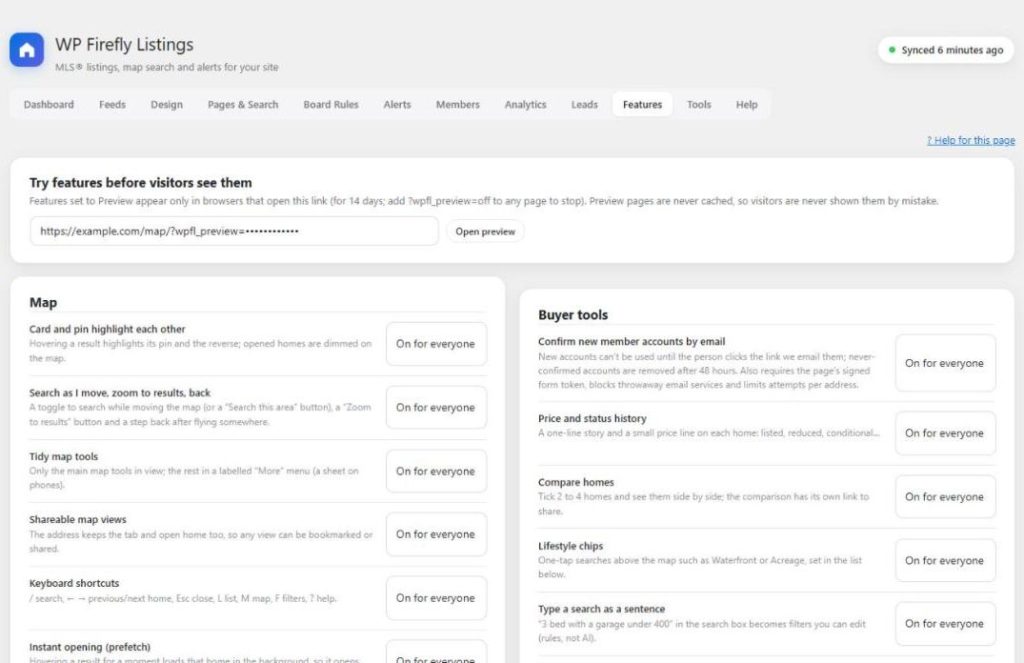
Try any feature privately
Every feature is Off, Preview or On, with a private preview link.
Screenshots show a REALTOR®’s live site. Your site uses your own brand, colours and listings.
New: property lines and history
Every lot on the map, with its assessments and its past
Zoom in and property lines appear. Buyers see the lot, what it’s assessed at and what it sold for before, without leaving your site.
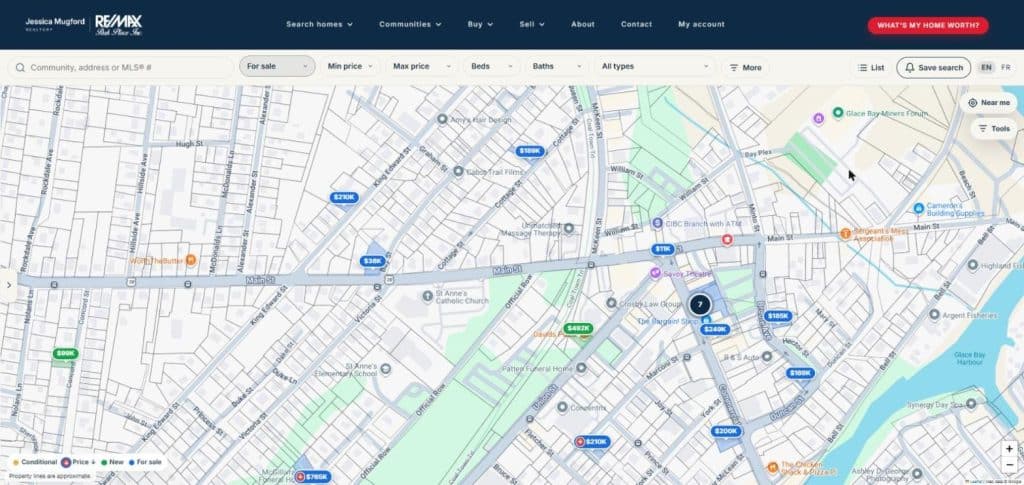
Property lines on the map
Lots with a listing take the colour of their pin. Lines show from street level.
- Works with your province’s parcel data: property lines from a parcel tile file, assessments from your data provider’s files
- Lots coloured like the pins: for sale, new, conditional and open house, so buyers see what’s available street by street
- Click any lot for its address, PID, latest assessment and lot size, or open its listing
- Assessment history: year-by-year assessed and taxable values with a chart, for signed-in visitors
- Listing history: every past listing of a property with dates, prices, days on market and changes, for signed-in members where your board allows it
- Sign-ups, not dead ends: “Log in to see assessment history” brings visitors back to the same lot and counts them as a lead
- Tidy map: roads, parks and Crown land left out, and a Property lines switch in Map tools
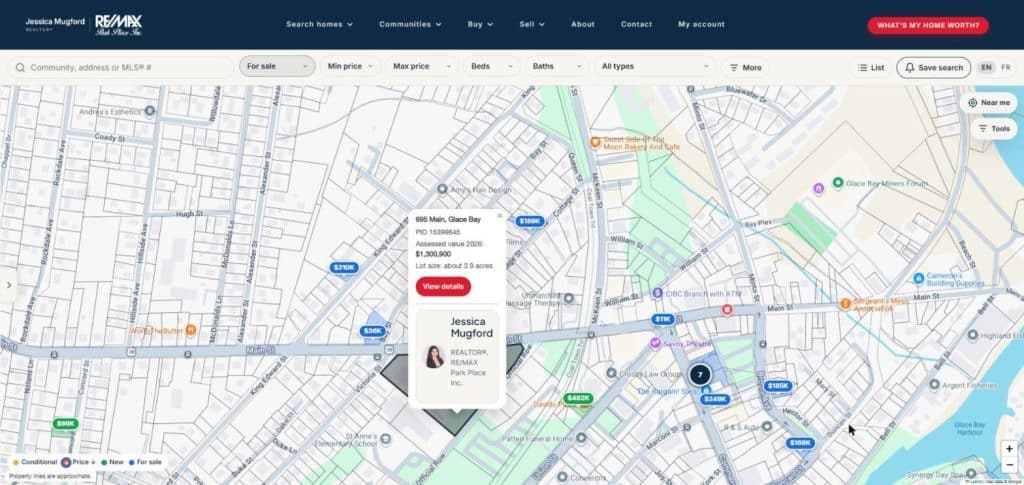
Click a lot, get the facts
Address, PID, assessed value and lot size, with your agent card.
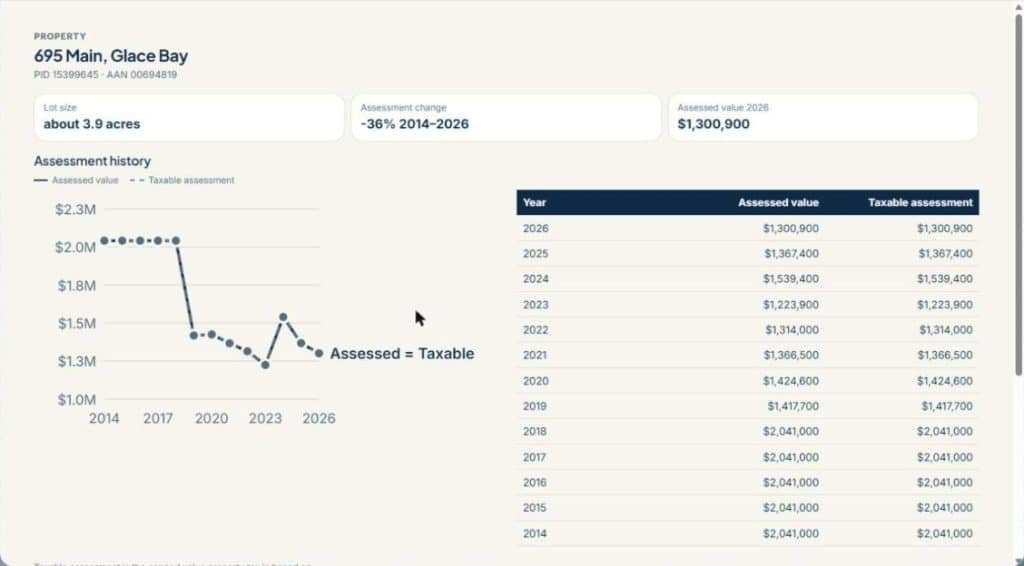
Assessment history
Assessed and taxable values year by year, with the change over time.
The whole site
Everything from first search to booked showing
Listing pages
Gallery, facts, features, rooms, price history, homes at the same address, similar homes nearby and an agent card.
Built for phones
Map and list toggle, bottom sheets, a compact search bar and phone gestures.
Your listings first
Feature your own agents’ or office’s listings on any page as a grid, carousel or list.
Community pages and area stats
Paged “Homes for sale in {community}” lists with live stats and what’s new this week.
Best-of list pages
Pages such as “Homes under $300K in {community}”, each a real page search engines can index.
SEO ready
Listing sitemaps in All in One SEO, Yoast or Rank Math, RealEstateListing schema, breadcrumbs and crawlable list pages.
Board RETS and CREA DDF® feeds
Board RETS feeds from Paragon, Matrix and Flexmls servers, and CREA DDF® feeds. A home both send shows once, from the board feed.
RESO Web API feeds
Supports RESO Web API servers, the successor to RETS, with presets for Bridge, Trestle, Spark and MLS Grid. Fields are read from the server’s metadata.
Your exclusive listings
Add off-MLS® listings in WordPress with photos and open houses. They show in search, on the map and in alerts, labelled “Exclusive”.
Test any feed first
Test mode imports a feed privately for admins and your preview link. Feed health, Test connection, and an email if a feed fails or stalls.
My account page
Saved homes, saved searches and emails, my places, recently viewed, profile and privacy, managed by visitors themselves.
Helps you follow board rules
Brokerage and MLS® number on every MLS® listing, the right disclaimer for each feed, “Powered by REALTOR.ca” on DDF® listings, sold data for signed-in members only and CASL-ready alerts.
Hourly sync and photo gate
Listings and photos refresh every hour, and new listings wait for their photos. WP-Cron takes over if the server cron stops.
Featured listings
Feature any listing with a ribbon, glow or badge in your own words. It comes first and ends by itself when the home sells or on your end date.
Works with page caching
Pages showing listings are cleared after each sync that changes one: LiteSpeed by tag, and WP Rocket, W3 Total Cache, WP Super Cache, SiteGround and more.
Copy the setup to the next site
Export every setting and feed mapping as a file and import it on another site. Logins and keys are never included.
Clean data, hidden listings
Addresses tidied and delisted homes removed daily. Hide any listing by MLS® number or link, with a reason and an end date.
Moving from WP-RETSpresso
Feeds, settings, favourites, photos and old links come across, and the old shortcodes keep working.
For agents and brokerages
Seller leads, follow-up and reports
Turn searches into conversations. Each tool has its own switch, so you turn on only what you need.
Home value estimate
Addresses suggested as you type, a drag-the-pin map when only the street is known, then a quick price range and an analysis request.
Homes like yours
A monthly email to homeowners about similar homes for sale nearby.
Seller reports
A private link per listing with weekly views and saves, enquiries and the competition nearby.
Monthly market reports
Reports per area, with an archive and an email sign-up.
Leads
Everyone who signs up, saves a search or enquires, with their activity, a hot, warm or cold score, tags and notes.
Send leads anywhere
A signed webhook for Zapier or Make, a Follow Up Boss connection and CSV export.
Privacy-first analytics
Visits, most viewed and saved homes, what people search for (including searches with no results) and email results.
Agent roster
Agent pages with their own listings, a CSV import with photos, and enquiries routed to the listing agent.
Agent menus that update themselves
Mega menu columns and phone menu items grouped by office, with photos. Agents appear and disappear as they join or leave.
New agents found in the feed
Agents on your brokerage’s listings who aren’t on the roster yet, with Add to roster as a draft. Quiet agents are flagged too.
Featured agents, rosters by office
Featured agents come first. Links such as /agents/?office=Downtown work without JavaScript and can be shared.
Your agents on other listings
Show one of your agents on other brokerages’ listings, shared out fairly or matched to their areas, with the enquiries going to them.
Polite sign-up prompts
Ask visitors to sign up after a few homes, on saving or on return visits. Never over an open listing.
Bot protection
Email confirmation, signed form tokens, throwaway-address blocking and rate limits. Bots never trigger lead emails.
Privacy controls
First-party tracking only, disclosed before sign-up, with opt-out, per-person export and delete, and retention settings.
Help built in
A setup checklist, every shortcode with examples, page recipes and troubleshooting.
Looks like your brand
Your brand, in one click.
Turn on “Use my theme’s colours and fonts” and your listings match the rest of your site. Try the styles on the right.
- Follows your theme through the WP Firefly
--wpff-*design tokens or your block theme’s presets - 12 one-click presets such as Classic, Coastal, Luxury, Harbour and Night, with full-photo, framed or lifted cards and photo mosaic, hero or strip layouts
- Fine-tune any colour: prices, badges, buttons and map bubbles. Badge text picks white or dark for contrast by itself
- Works with any theme or page builder: shortcodes, WPBakery elements and a widget
- Template overrides for cards, listing pages, the map and alert emails
For builders and developers
Drop listings into any page
Every shortcode is also a WPBakery element in the Listings category.
| Shortcode | What it shows |
|---|---|
[wpfl_map] |
Full-page map search with filters, results list, saved homes and draw an area |
[wpfl_results] |
Paged list with a filter bar, no map |
[wpfl_listings] |
A set of listings: new, price drops, open houses, your agent or office, by areafilter, agent, area, limit, columns, layout |
[wpfl_search] |
Search box that opens the map with the chosen filters |
[wpfl_count] |
A live number, such as new listings this week |
[wpfl_activity] |
Market activity: new listings, price and status changes, open houses, video tours |
[wpfl_alert_signup] |
Alerts sign-up with consent and double opt-in |
[wpfl_communities] |
Community tiles with live counts |
[wpfl_open_houses] |
Upcoming open housesarea, office, agent, type |
[wpfl_favourites] |
A visitor’s saved homes and saved searches |
[wpfl_list_title] [wpfl_list_intro] |
List page heading and intro that follow the address |
[wpfl_area_stats] |
Live market stats for a community |
[wpfl_value_estimate] |
Home value quick range and analysis request |
[wpfl_market_report_signup] |
Monthly market report sign-up |
[wpfl_agents] [wpfl_agent] |
Agent roster and agent pagesfilters by office or area from the address |
[wpfl_agents_menu] |
Agents grouped by office with photos, for mega menusoffices, split, photo, heading |
[wpfl_language_switch] |
English, French and Spanish switch |
[wpfl_account] [wpfl_account_link] |
My account page, and a Sign in / My account link for menus |
[wpfl_terms] |
Members’ terms of use for sold data |
[wpfl_listings filter="featured" layout="carousel"]
<!-- new this week in one community -->
[wpfl_listings filter="new" area="Anytown" limit="6"]
<!-- a live number -->
[wpfl_count show="new" days="1"] new today
<!-- map links keep their filters -->
/map/?area=Anytown&price_max=400000&beds_min=3
Questions
Good to know
Which boards and feeds does it work with?
Board RETS feeds from Paragon, Matrix and Flexmls servers through field mapping (for example the Nova Scotia Association of REALTORS®); RESO Web API servers, with presets for Bridge, Trestle, Spark and MLS Grid or any board’s own RESO server; and CREA DDF® feeds through the REALTOR.ca DDF® Web API. You can also add your own exclusive listings. Test mode lets you check a feed’s listings privately before they go public.
Do I need feed credentials?
Yes. Your board or brokerage issues RETS logins, RESO Web API feeds use an OAuth client ID and secret or an access token from your provider, and DDF® feeds use your CREA DDF® feed’s username and password. They are stored encrypted in WordPress.
Will it match my theme?
Yes. Turn on “Use my theme’s colours and fonts” and your listings follow your site, or set the colours yourself. It works with WPBakery and other page builders.
Do I need a Google Maps key?
No. The map runs on free OpenFreeMap tiles with no key. If you prefer Google’s road and satellite maps, add your Google Maps Platform key in the map settings.
How often does it update?
Every hour, with photo refreshes. If the server cron stops, WP-Cron takes over after 3 hours and the dashboard warns you after 2.
Can Google index my listings?
Yes, if your board’s feed terms allow it. Listing pages get sitemaps, schema and one clean set of tags through your SEO plugin, and one switch turns indexing off.
Does it work on phones?
Yes. Phones get a map and list toggle, bottom sheets, Near me and Follow me, and visitors can install your site as an app.
Can I show my own listings first?
Yes. Feature your own agents’ or office’s listings on any page as a grid, carousel or list, and link to the map with the same filters.
Can I add listings that aren’t on the MLS®?
Yes. Add exclusive or off-MLS® listings in WordPress with Media Library photos, open houses and your own details. The address is placed on the map for you to check. They appear in search, on the map and in alerts, labelled “Exclusive” with your own disclaimer, and come down as soon as you unpublish them. Boards have rules on advertising exclusive and office listings, so check yours first.
Can I hide a listing from my site?
Yes. Hide any listing by MLS® number or listing link, or with “Hide from this site” on the listing, with an optional reason and end date. It stays off searches, the map, alerts, sitemaps and search engines through every sync, from every feed, and the Hidden listings screen shows who hid what and why, with one-click Unhide. Some board and DDF® rules limit leaving out other brokerages’ listings, so check yours.
Can it show property lines and assessments?
Yes, where parcel data is available, so it works with your province’s parcel data. Property lines come from a parcel tile file (PMTiles) and assessments from your provider’s data files. Visitors click any lot for its address, PID, assessed value and lot size. Signed-in visitors also see the assessment history, and members see the property’s past listings where your board allows it.
Does it come in French and Spanish?
Yes. Every word the plugin shows, for visitors and in the admin, is in English, French (Canada) and Spanish. You choose the main language and where the switch shows: in the map’s search bar, on listing pages, in your menu or with a shortcode.
Do members need a password?
No. They can sign in or sign up with a one-time link or a 6-digit code sent by email, which also confirms a new account. “Use a password instead” is there for those who prefer it, and staff accounts always use their password.
Will it work with my caching plugin?
Yes. Pages showing listings are cleared after each sync that changes a listing: LiteSpeed by tag, and WP Rocket, W3 Total Cache, WP Super Cache, SiteGround, WP Fastest Cache, Breeze and Hummingbird by full purge.
Does it suit a brokerage with several offices?
Yes. The roster groups agents by office, the mega menu and phone menu update themselves when agents join or leave, new agents on your listings are flagged for you to add, and you can copy your setup to each agent’s own site.
Can visitors manage their own alerts and data?
Yes. The My account page lets them rename, change, pause or delete saved searches, stop all emails, edit their places and profile, download their information or delete their account.
Can I try a feature before visitors see it?
Yes. Set any feature to Preview and only browsers that open your private preview link see it. Switch it On when you’re happy.
Does it help me find leads?
Yes. Sign-ups, saved searches, home value requests and enquiries land in the Leads screen with each person’s activity and a score, and can go on to Zapier, Make or Follow Up Boss.
How do updates work?
Updates come through the WP Firefly Hub with your membership licence.
What does it need to run?
WordPress (tested up to 7.1), your board’s feed credentials and an hourly server cron job (WP-CLI). WP-Cron is the backup if the server cron stops.
Included in every WP Firefly plan
Launch your listings site this week
Get WP Firefly Listings and every other plugin in the collection with one membership.
Why WPFirefly
Us vs. them
What you would pay for the same tools elsewhere, compared with one WPFirefly membership.
| Competitor | Type | Starting price | Notes |
|---|---|---|---|
| Tidio | Chatbot SaaS | $29/mo | Limited AI, $39+ for advanced features |
| Drift | AI Chatbot SaaS | $1500+/mo | Enterprise-focused, expensive |
| LivePerson | Enterprise AI Chatbot | Custom pricing (>$500/mo) | Not SMB-friendly |
| AI Engine (WordPress plugin) | Chatbot / Content AI | $49/year | No multi-assistant or page builder features |
| Uncanny Automator | Workflow automation plugin | $149/year | Automation only, no AI |
| ManyChat | Messenger bot SaaS | $15–$99/mo | Not optimized for websites |
| WPFirefly membership | Full plugin suite | From $19.95/mo | AI ChatbotAI SEOAuto BloggerAI FAQ builder+ every other plugin |
Plans & pricing
Simple plans. Every plugin included.
Pick how many sites you run. Switch between monthly and yearly below.
🔥 Limited time offer Plans from $19.95/mo (normally $99/mo)
- Monthly
- Yearly
1 Site License
Number of Sites: 1
All Plugins Included!
Some examples:
- WPFirefly AI Chatbot
- WpFirefly Product Gallery
- WPFirefly Staff Directory
- WPFirefly 2FA
- WPFirefly AI Assistant
- WP Firefly Cart
- WP Firefly AI Auto Blogger
- Dynamic Header & Footer Script Manager
AND MANY MORE!
$19.95
Monthly
5 Site License
Number of Sites: 5
All Plugins Included!
Some examples:
- WP Firefly Cart
- WP Firefly Gravity Guide
- WP Firefly FAQs With AI
- WPFirefly Admin Search
- WP Firefly Content Pilot
- WP Firefly Reviews
- WPFirefly Children On Page
- WP Firefly
AND MANY MORE!
$35.00
Monthly
10 Site License
Number of Sites: 10
All Plugins Included!
Some examples:
- WPFirefly Children On Page
- WPFirefly Admin Search
- WP Firefly SEO
- WP Firefly Popup
- WPFirefly Blog Customizer
- WP Firefly Reviews
- WP Firefly Dismiss All Alerts
- Dynamic Header & Footer Script Manager
AND MANY MORE!
$69.00
Monthly
Developer License Unlimited*
Number of Sites: Unlimited*
All Plugins Included!
Some examples:
- WP Firefly Cart
- Location Mapper
- WP Firefly Dismiss All Alerts
- WPFirefly AI Assistant
- WPFirefly Admin Search
- Login Expiry Notification
- WPFirefly Blog Customizer
- WP Firefly Content Pilot
AND MANY MORE!
$119.00
Monthly
1 Site License
Number of Sites: 1
All Plugins Included!
Some examples:
- WP Firefly Popup
- WpFirefly Product Gallery
- WP Firefly Reviews
- WPFirefly Children On Page
- WPFirefly Backups
- WP Firefly AI Auto Blogger
- WP Firefly Gravity Guide
- Login Expiry Notification
AND MANY MORE!
$199.50
Yearly
2 Months Free
5 Site License
Number of Sites: 5
All Plugins Included!
Some examples:
- WPFirefly Blog Customizer
- Dynamic Header & Footer Script Manager
- WP Firefly Cart
- WPFirefly Admin Search
- WPFirefly AI Chatbot
- WP Firefly Listings
- WP Firefly AI Auto Blogger
- WP Firefly
AND MANY MORE!
$350.00
Yearly
2 Months Free
10 Site License
Number of Sites: 10
All Plugins Included!
Some examples:
- Single Page & Post Custom CSS
- WPFirefly Staff Directory
- Content Schedule Expiry
- WP Firefly
- WP Firefly SEO
- Location Mapper
- WPFirefly Backups
- WPFirefly AI Assistant
AND MANY MORE!
$690.00
Yearly
2 Months Free
Developer License Unlimited*
Number of Sites: Unlimited*
All Plugins Included!
Some examples:
- WP Firefly Cart
- WP Firefly Content Pilot
- WpFirefly Product Gallery
- WP Firefly Dismiss All Alerts
- WPFirefly 2FA
- WP Firefly: A/B Split Tests
- WPFirefly Children On Page
- WP Firefly AI Auto Blogger
AND MANY MORE!
$1190.00
Yearly
2 Months Free
* Unlimited plans are within reason. Obvious abuse will have your licence terminated without refund.