
Security & backups
Backups you never have to think about
A professional-grade backup solution: automated schedules, chunked archiving for large sites, cloud destinations and one-click restores, with full visibility into every run.
- WPFirefly Backups
- Included in every plan
- Updates through the Hub
Key features
Everything WPFirefly Backups does for you
Scheduled backups
Hourly, daily, weekly or monthly, at the time you choose.
Chunked archiving
Large sites are processed in small chunks so your site stays fast.
Multiple destinations
Local storage, Amazon S3, Dropbox or FTP/SFTP.
One-click restore
Roll back to any stored backup from the Backup Runs tab.
Progress and logs
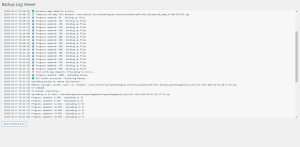
Real-time progress with ETA and detailed logs for every run.
Selective backups
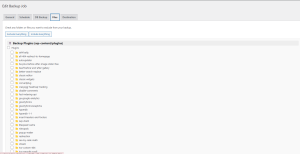
Back up files, the database or both, and exclude what you don’t need.
Retention policies
Automatically remove old backups to save space.
Email notifications
Know when a backup completes or needs attention.
Pro tools
Job cloning, import/export and a full diagnostics panel.
How it works
Up and running in minutes
- ConfigureChoose what to back up and where to store it.
- SchedulePick a frequency, a quiet time and your retention rules.
- Back up on demandClick Run Backup Now before any big update.
- Restore in a clickPick a backup run and click Restore.
See it in action
Take a closer look
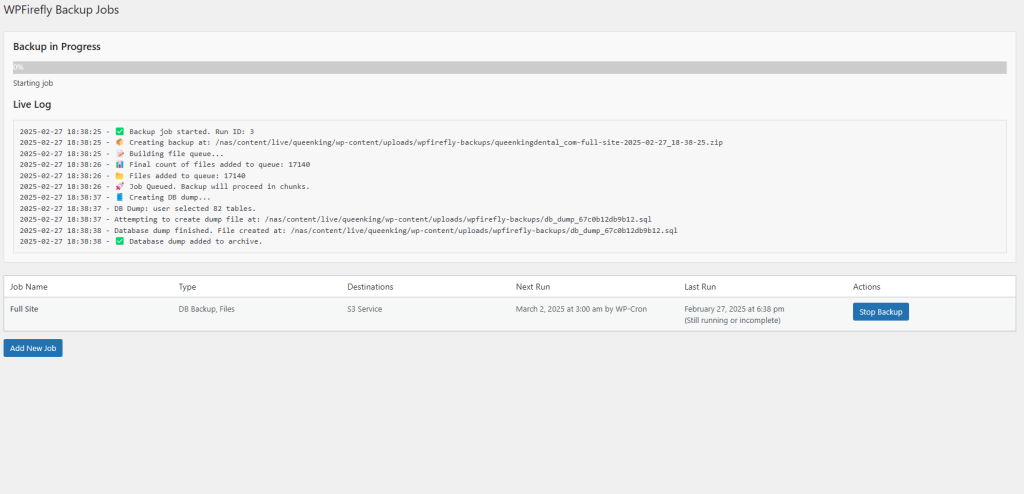
Questions
Frequently asked questions
For active blogs or WooCommerce stores, we recommend daily backups. For static sites, a weekly or monthly schedule is sufficient.
No! WP Firefly Backups processes backups in chunks, preventing excessive server load. The backup runs in the background without affecting your site’s speed.
Yes! You can manually exclude plugins, themes, or uploads that you don’t want to back up. This helps save storage space and speeds up the backup process.
WP Firefly Backups automatically detects and retries failed backups. Logs will also provide detailed insights into what went wrong.
Yes, you can store backups locally in any directory of your choice, such as /public_html/backups/.
You can set WP Firefly Backups to keep only the most recent X backups, automatically deleting old ones. This prevents storage overload.
Yes! WP Firefly Backups works seamlessly with WordPress Multisite (WPMU).
Included in every WPFirefly plan
Get WPFirefly Backups and every other plugin
One membership, one Hub, the whole collection. Pick a plan below or join in a minute.
Why WPFirefly
Us vs. them
What you would pay for the same tools elsewhere, compared with one WPFirefly membership.
| Competitor | Type | Starting price | Notes |
|---|---|---|---|
| Tidio | Chatbot SaaS | $29/mo | Limited AI, $39+ for advanced features |
| Drift | AI Chatbot SaaS | $1500+/mo | Enterprise-focused, expensive |
| LivePerson | Enterprise AI Chatbot | Custom pricing (>$500/mo) | Not SMB-friendly |
| AI Engine (WordPress plugin) | Chatbot / Content AI | $49/year | No multi-assistant or page builder features |
| Uncanny Automator | Workflow automation plugin | $149/year | Automation only, no AI |
| ManyChat | Messenger bot SaaS | $15–$99/mo | Not optimized for websites |
| WPFirefly membership | Full plugin suite | From $10/mo | AI ChatbotAI SEOAuto BloggerAI FAQ builder+ every other plugin |
Plans & pricing
Simple plans. Every plugin included.
Pick how many sites you run. Switch between monthly and yearly below.
🔥 Limited time offer Plans from $10/mo (normally $99/mo)
- Monthly
- Yearly
1 Site License
Number of Sites: 1
All Plugins Included!
Some examples:
- Location Mapper
- Dynamic Header & Footer Script Manager
- WP Firefly Gravity Guide
- WP Firefly: A/B Split Tests
- URL Var to Form Field
- WP Firefly
- WPFirefly Blog Customizer
- WP Firefly SEO
AND MANY MORE!
$10.00
Monthly
5 Site License
Number of Sites: 5
All Plugins Included!
Some examples:
- WP Firefly SEO
- WPFirefly Staff Directory
- Dynamic Header & Footer Script Manager
- URL Var to Form Field
- WP Firefly Accessibility
- WPFirefly AI Assistant
- WP Firefly Cart
- WPFirefly Blog Customizer
AND MANY MORE!
$35.00
Monthly
10 Site License
Number of Sites: 10
All Plugins Included!
Some examples:
- WP Firefly
- Single Page & Post Custom CSS
- Location Mapper
- Content Schedule Expiry
- WP Firefly Reviews
- WP Firefly Popup
- WP Firefly AI Auto Blogger
- WP Firefly SEO
AND MANY MORE!
$69.00
Monthly
Developer License Unlimited*
Number of Sites: Unlimited*
All Plugins Included!
Some examples:
- WP Firefly SEO
- WpFirefly Product Gallery
- URL Var to Form Field
- WP Firefly Listings
- Login Expiry Notification
- WPFirefly Children On Page
- WP Firefly Accessibility
- WPFirefly 2FA
AND MANY MORE!
$119.00
Monthly
1 Site License
Number of Sites: 1
All Plugins Included!
Some examples:
- WP Firefly Gravity Guide
- WP Firefly Accessibility
- WP Firefly AI Auto Blogger
- WP Firefly Reviews
- Content Schedule Expiry
- WP Firefly Popup
- WPFirefly Admin Search
- WP Firefly FAQs With AI
AND MANY MORE!
$99.00
Yearly
2 Months Free
5 Site License
Number of Sites: 5
All Plugins Included!
Some examples:
- WPFirefly Backups
- WP Firefly Dismiss All Alerts
- URL Var to Form Field
- WP Firefly Cart
- WP Firefly FAQs With AI
- WP Firefly Accessibility
- WPFirefly AI Chatbot
- Login Expiry Notification
AND MANY MORE!
$350.00
Yearly
2 Months Free
10 Site License
Number of Sites: 10
All Plugins Included!
Some examples:
- WP Firefly Cart
- Content Schedule Expiry
- WPFirefly Backups
- WP Firefly: A/B Split Tests
- Location Mapper
- WPFirefly AI Assistant
- WP Firefly Listings
- WP Firefly Popup
AND MANY MORE!
$690.00
Yearly
2 Months Free
Developer License Unlimited*
Number of Sites: Unlimited*
All Plugins Included!
Some examples:
- Location Mapper
- WPFirefly Staff Directory
- WP Firefly Dismiss All Alerts
- WP Firefly AI Auto Blogger
- WPFirefly Blog Customizer
- Login Expiry Notification
- WP Firefly SEO
- Single Page & Post Custom CSS
AND MANY MORE!
$1190.00
Yearly
2 Months Free
* Unlimited plans are within reason. Obvious abuse will have your licence terminated without refund.
