
Site building
Show child pages as a beautiful, responsive grid
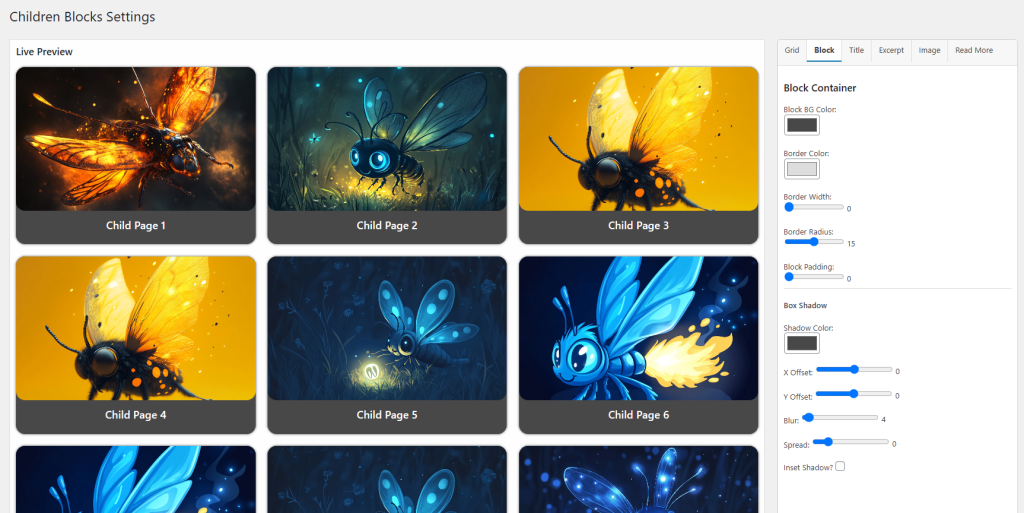
Tick one box on a parent page and its child pages appear as a modern, mobile-ready block grid, styled exactly the way you want with a real-time preview.
- WPFirefly Children On Page
- Included in every plan
- Updates through the Hub

Key features
Everything WPFirefly Children On Page does for you
One checkbox
Turn the child page display on or off per parent page, no code needed.
Responsive grid
A flexible grid that adapts to mobile, tablet and desktop.
Complete design control
Columns, gaps, colors, borders and fonts for titles and buttons.
Hover effects
Custom hover states for titles and read-more buttons.
Excerpts and read more
Toggle excerpts, set word counts and style the button.
Real-time preview
Preview 10 sample blocks while you adjust every setting.
How it works
Up and running in minutes
- Install and activateUpload the plugin and activate it.
- Set global stylesFine-tune layout, colors, fonts and hover states in Children Blocks settings.
- Enable on a pageTick “Display children blocks” on any parent page.
- PublishVisitors see a polished grid of child pages.
See it in action
Take a closer look
This is the live plugin, showing the child pages of this page:
[wpfirefly_children]
Questions
Frequently asked questions
Included in every WPFirefly plan
Get WPFirefly Children On Page and every other plugin
One membership, one Hub, the whole collection. Pick a plan below or join in a minute.
Why WPFirefly
Us vs. them
What you would pay for the same tools elsewhere, compared with one WPFirefly membership.
| Competitor | Type | Starting price | Notes |
|---|---|---|---|
| Tidio | Chatbot SaaS | $29/mo | Limited AI, $39+ for advanced features |
| Drift | AI Chatbot SaaS | $1500+/mo | Enterprise-focused, expensive |
| LivePerson | Enterprise AI Chatbot | Custom pricing (>$500/mo) | Not SMB-friendly |
| AI Engine (WordPress plugin) | Chatbot / Content AI | $49/year | No multi-assistant or page builder features |
| Uncanny Automator | Workflow automation plugin | $149/year | Automation only, no AI |
| ManyChat | Messenger bot SaaS | $15–$99/mo | Not optimized for websites |
| WPFirefly membership | Full plugin suite | From $10/mo | AI ChatbotAI SEOAuto BloggerAI FAQ builder+ every other plugin |
Plans & pricing
Simple plans. Every plugin included.
Pick how many sites you run. Switch between monthly and yearly below.
🔥 Limited time offer Plans from $10/mo (normally $99/mo)
- Monthly
- Yearly
1 Site License
Number of Sites: 1
All Plugins Included!
Some examples:
- Content Schedule Expiry
- WP Firefly Gravity Guide
- Single Page & Post Custom CSS
- WP Firefly Content Pilot
- WPFirefly AI Assistant
- WP Firefly Reviews
- Login Expiry Notification
- WPFirefly Staff Directory
AND MANY MORE!
$10.00
Monthly
5 Site License
Number of Sites: 5
All Plugins Included!
Some examples:
- WpFirefly Product Gallery
- WPFirefly AI Chatbot
- WP Firefly Accessibility
- WPFirefly Backups
- Single Page & Post Custom CSS
- Location Mapper
- WPFirefly Blog Customizer
- WPFirefly Children On Page
AND MANY MORE!
$35.00
Monthly
10 Site License
Number of Sites: 10
All Plugins Included!
Some examples:
- Single Page & Post Custom CSS
- WP Firefly SEO
- Content Schedule Expiry
- URL Var to Form Field
- WPFirefly Staff Directory
- WP Firefly Cart
- WP Firefly Content Pilot
- WPFirefly 2FA
AND MANY MORE!
$69.00
Monthly
Developer License Unlimited*
Number of Sites: Unlimited*
All Plugins Included!
Some examples:
- WP Firefly Dismiss All Alerts
- WPFirefly Children On Page
- WP Firefly Accessibility
- WP Firefly FAQs With AI
- Content Schedule Expiry
- WP Firefly Cart
- WPFirefly Blog Customizer
- WP Firefly Popup
AND MANY MORE!
$119.00
Monthly
1 Site License
Number of Sites: 1
All Plugins Included!
Some examples:
- WP Firefly Accessibility
- WpFirefly Product Gallery
- WPFirefly 2FA
- WP Firefly Reviews
- WP Firefly Dismiss All Alerts
- WP Firefly Cart
- WPFirefly Backups
- Dynamic Header & Footer Script Manager
AND MANY MORE!
$99.00
Yearly
2 Months Free
5 Site License
Number of Sites: 5
All Plugins Included!
Some examples:
- WP Firefly AI Auto Blogger
- Location Mapper
- WPFirefly Admin Search
- URL Var to Form Field
- WP Firefly Cart
- WPFirefly Blog Customizer
- WPFirefly 2FA
- WP Firefly Popup
AND MANY MORE!
$350.00
Yearly
2 Months Free
10 Site License
Number of Sites: 10
All Plugins Included!
Some examples:
- WP Firefly Accessibility
- WPFirefly Backups
- WpFirefly Product Gallery
- WP Firefly Dismiss All Alerts
- WPFirefly AI Chatbot
- Content Schedule Expiry
- WPFirefly Blog Customizer
- WP Firefly Gravity Guide
AND MANY MORE!
$690.00
Yearly
2 Months Free
Developer License Unlimited*
Number of Sites: Unlimited*
All Plugins Included!
Some examples:
- Single Page & Post Custom CSS
- WP Firefly AI Auto Blogger
- WPFirefly AI Assistant
- Content Schedule Expiry
- WPFirefly Blog Customizer
- Login Expiry Notification
- WP Firefly Listings
- WP Firefly
AND MANY MORE!
$1190.00
Yearly
2 Months Free
* Unlimited plans are within reason. Obvious abuse will have your licence terminated without refund.
